
10 vibe coding ideas you can build today
A Black Friday prize wheel, an Advent calendar, a quote calculator and seven more vibe coding ideas you can build today. Each with a starter prompt.
12 November 2026 · 10 perc olvasás

You know that moment when you realise that something you’ve been piecing together from three spreadsheets, two emails and a sticky note could be solved by a simple little app in an afternoon? It used to take a developer, a quote and weeks. Today, all you need is to describe what you want. That’s what vibe coding is about, and in this article we’ve collected ten practical vibe coding ideas you can build today. Once you get the hang of it, one a day is easy, and you can put together a lot more than that in a single day. Each idea comes with a starter prompt, so you don’t have to stare at a blank screen.
With Black Friday coming up, followed by Advent and Christmas, we put the seasonal ideas first. They’re the hottest right now, and simple enough to fit into an afternoon.
Prices are given in Hungarian forints, with approximate euro amounts.
1. A Black Friday prize wheel or mystery box
A plain “20% off everything” doesn’t excite anyone anymore, because everyone does it. With a little game, though, your customer gets an experience, not just a discount. With the prize wheel, they spin once and it stops wherever luck decides: 10%, 15%, free shipping or a surprise gift. With the mystery box, they pick one of three (or more) wrapped boxes, and a click reveals what’s inside. Both are short and snappy, and exactly the kind of thing people love to show their friends.
If you ask for an email address before the game, you’ll also end the campaign with a nice, fresh list of subscribers. That’s worth gold long after Black Friday.
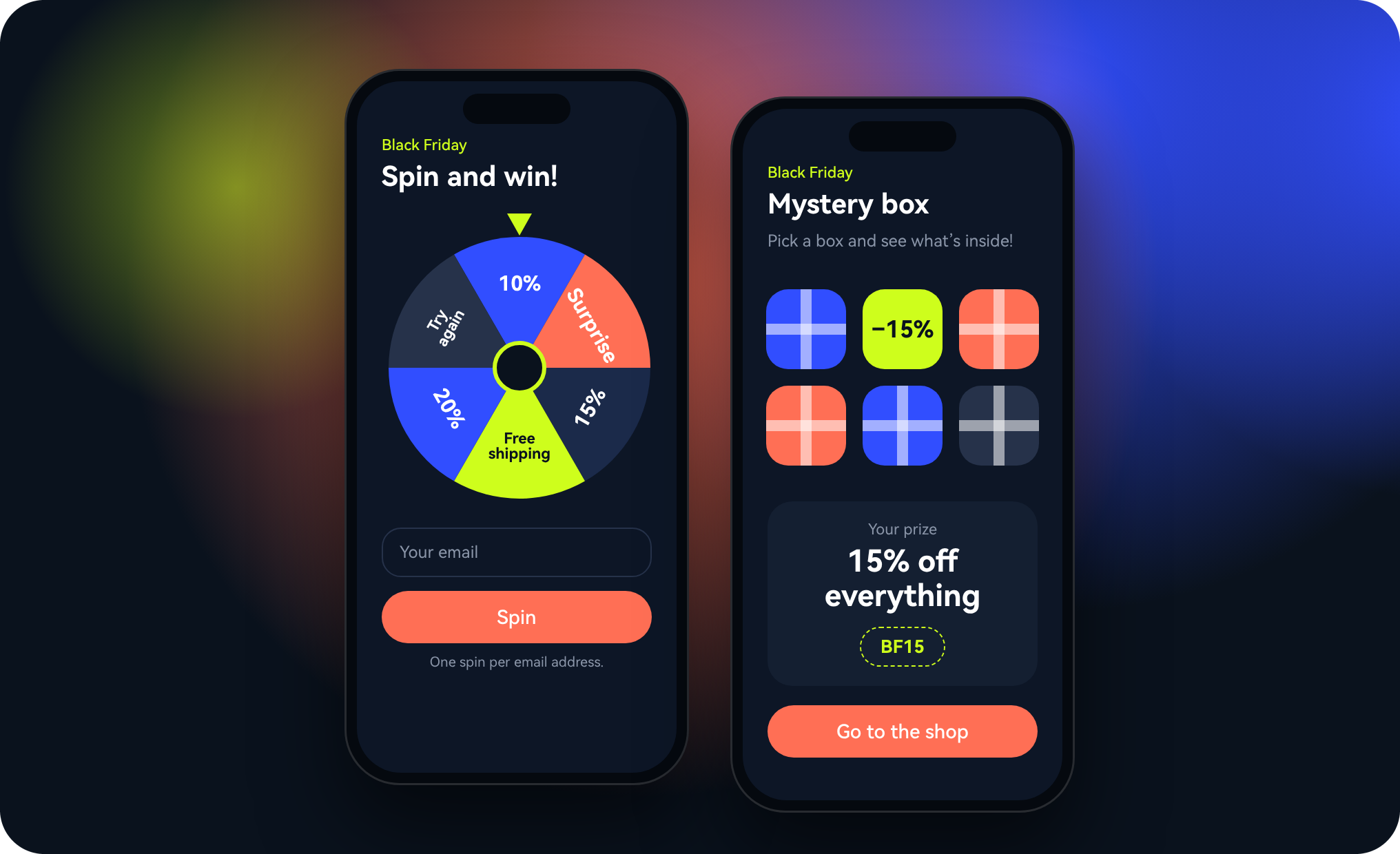
💡 Prompt tip: “Create a Black Friday prize wheel page for [shop name]. The wheel should have 6 segments: 10%, 15%, 20% off, free shipping, a surprise gift and ‘Try again tomorrow’. Ask for an email address before spinning, allow only one spin per address, and show the coupon code after the prize. Put a link to the game rules under the button. Make it dark and elegant, with gold accents.”
🚀 Pro tip: create game rules or terms of use for every campaign like this, even if the prize is “just” a discount. At the very least, spell out who can take part, how long the game runs, what the coupon is valid for and until when, and what happens to the email addresses you collect. Link them under the game, and if you’re unsure, have a lawyer look them over. Also, create the coupon codes in your webshop first and only then add them to the prompt, otherwise the winner gets a code that doesn’t exist.
2. An Advent calendar that brings people back every day
The Advent calendar is one of the smartest tricks in marketing: for 24 days it gives people a reason to come back to you again and again. In the online version, a new window opens every day, hiding a daily coupon, a recipe, a tip, a short video or a giveaway. The key is that windows only open on their own day, so curiosity brings visitors back every morning.
It’s not just for webshops: a hair salon can share a daily hair care tip, an accountant a year-end to-do, and a café a daily coffee recipe. If you write all 24 days in advance, the calendar does the work for you afterwards. If there are coupons or prizes behind the windows, set out the conditions in game rules here too.
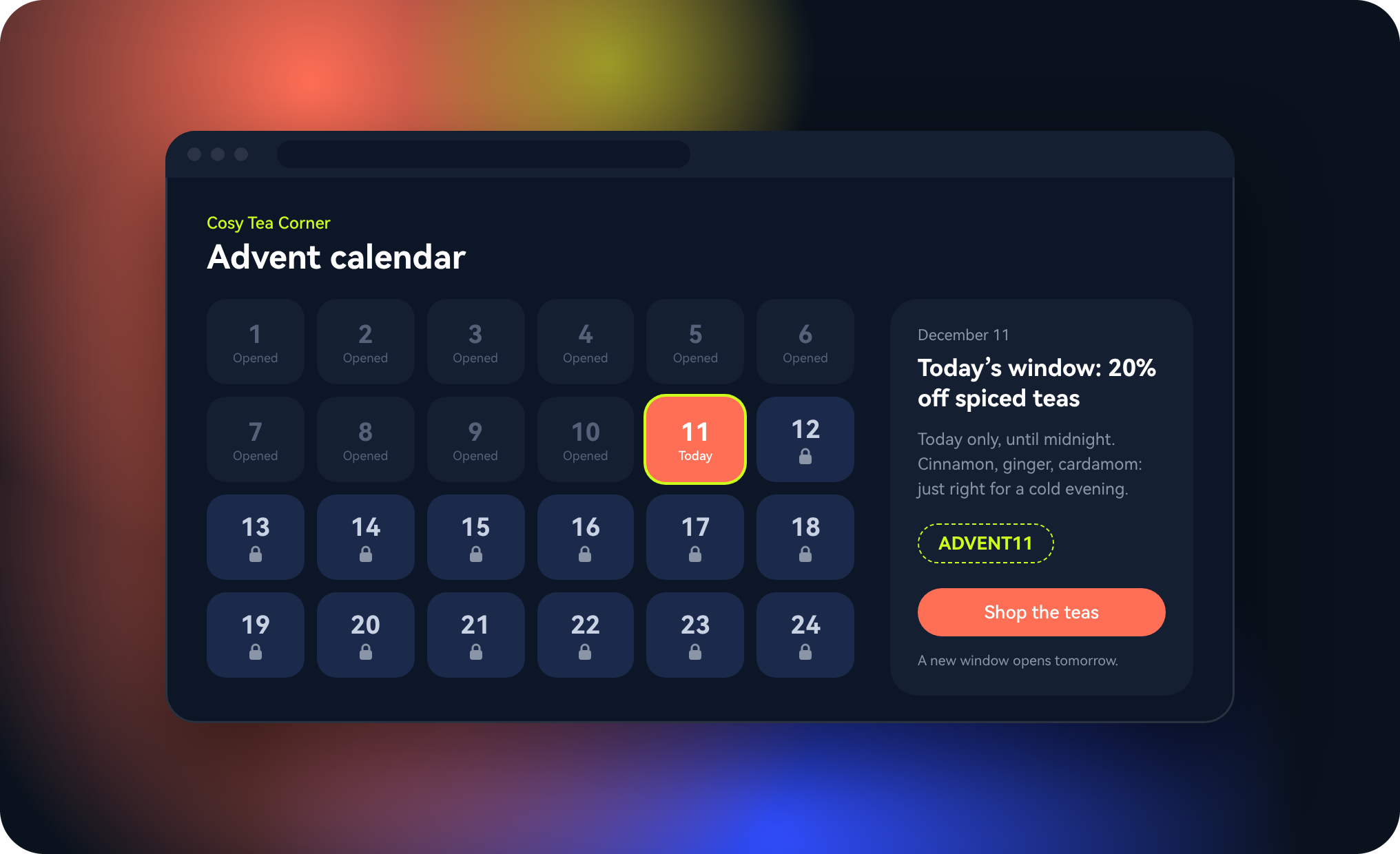
💡 Prompt tip: “Create an online Advent calendar for [business name] with 24 windows. Each window should only open on its own day (1–24 December) and stay closed and greyed out before that. Behind the windows there can be text, an image and a coupon code, filled in from a list. Make it warm and Christmassy, but not kitsch: cream, deep green and red.”
3. A gift voucher page for last-minute shoppers
Every December, there’s a crowd that realises on the 22nd that they haven’t bought anything for anyone yet. For them, a gift voucher is a lifesaver, and for you it’s guaranteed income in January too. On a simple page, they choose an amount or a service, enter who it’s for, add a nice message and send the request. You reply with a lovely voucher they can print or forward by email.
💡 Prompt tip: “Create a gift voucher request page for [business name]. Let people choose a HUF 5,000, 10,000 or 20,000 voucher (about €13, €25 or €50), or a specific service. Ask for the buyer’s name and email address, the recipient’s name and a short message. Show the requests to me in a list.”
Seasonal summary 🎄 For Black Friday, a little game is worth more than another percent off; the Advent calendar brings visitors back for 24 days; and the voucher page catches the last-minute shoppers. All three fit into an afternoon, you just need to gather the content in advance.
4. A quote calculator that does the maths for you
If every other email you get starts with “How much would it cost to…?”, this idea is for you. In a calculator, the customer answers a few questions (how many square metres, what material, by when) and instantly sees an estimate. You then receive an enquiry with all the details included, and the customer knows what to expect. It works for almost any service, from painters to event planners.
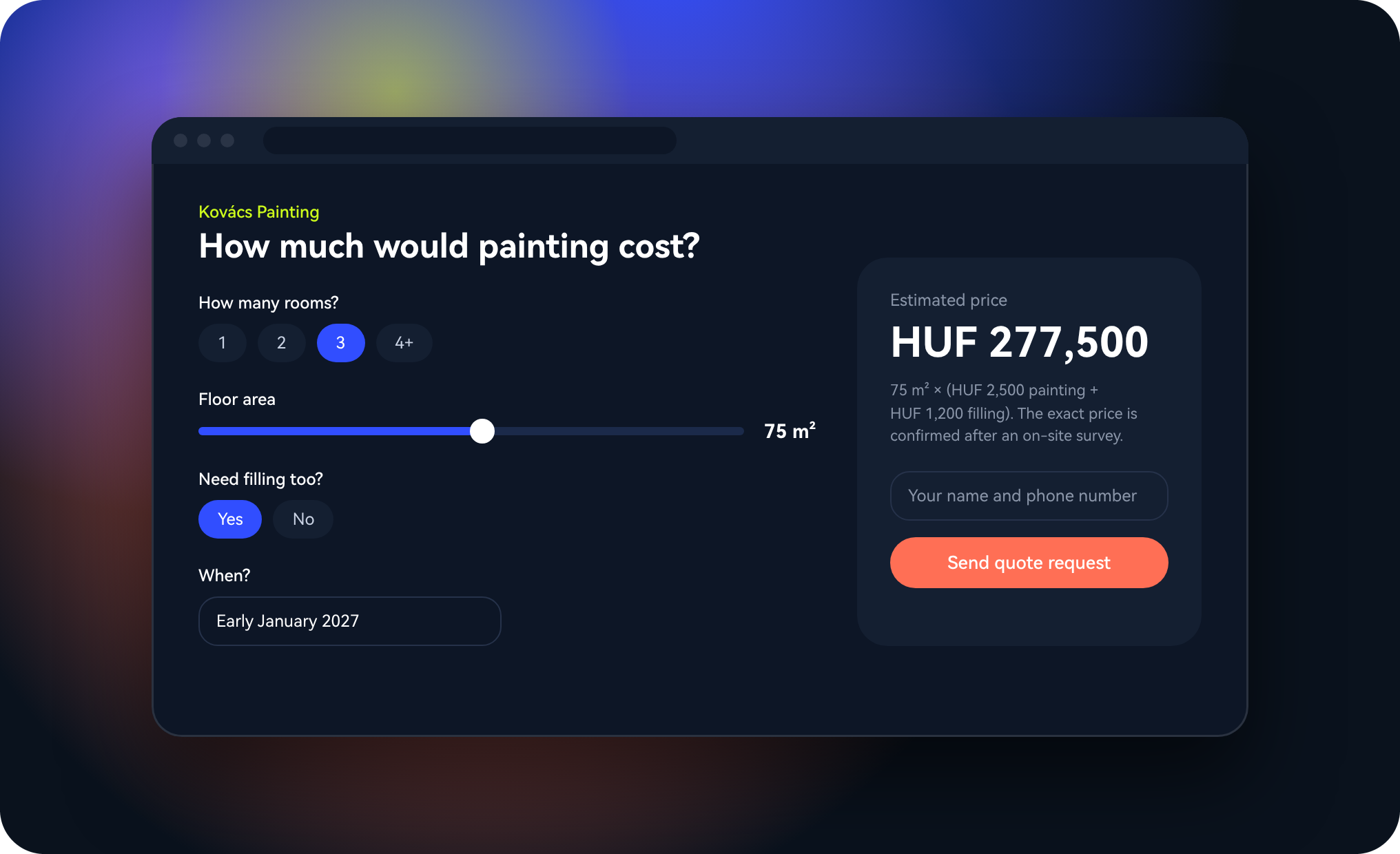
💡 Prompt tip: “Create a quote calculator for a painting and decorating business. Questions: how many rooms, how many square metres, whether filling is needed, and by when. The base price is HUF 2,500/m² (about €6.50), filling is +HUF 1,200/m² (about €3). Show an estimated price at the end, with a button below it to send the quote request with the details entered.”
🚀 Pro tip: always state that it’s an estimate and that the exact price is confirmed after an on-site survey. That way nobody feels misled if the final amount differs a little.
5. A QR code menu or price list
A laminated menu with prices taped over three times isn’t the best first impression. A digital menu can be updated anytime, and when the soup of the day runs out, you remove it with a click. You only put a QR code on the table, and guests see the dishes on their phone with photos, allergens and prices. The same works as a price list in salons, workshops or at a market stall.
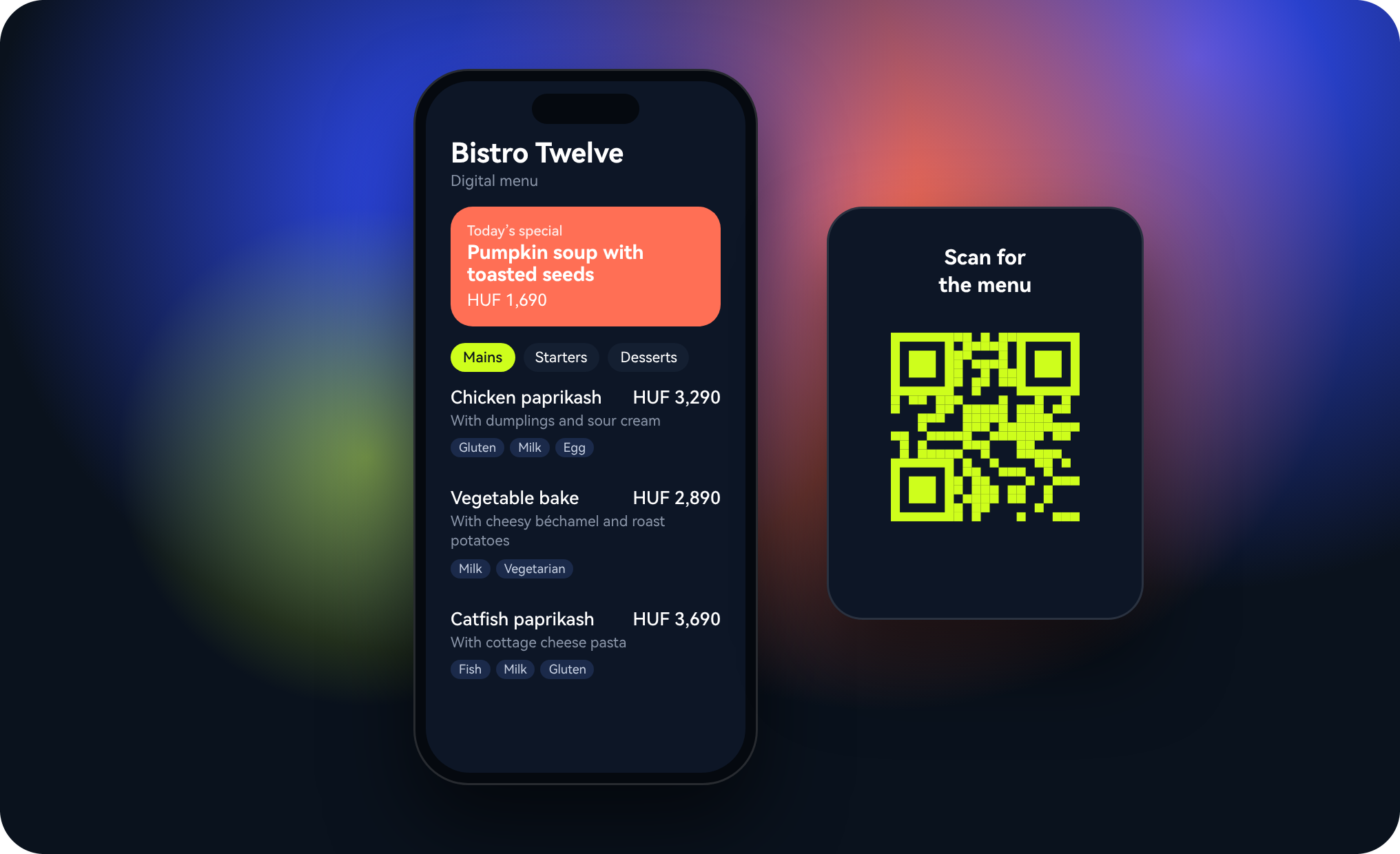
💡 Prompt tip: “Create a mobile-optimised digital menu for [venue name]. Categories: starters, mains, desserts, drinks. Each dish should have a name, a short description, a price and allergen labels. At the top, add a ‘Today’s special’ block that I can easily swap.”
6. A product finder quiz
Many people don’t buy because they don’t know which product is right for them. A quiz takes that decision off their shoulders, and it’s fun too. “Which coffee suits you?”, “What skincare routine do you need?”, “Which workout plan should you start with?” Five or six questions, then a personalised recommendation and a button that takes them straight to the product. People love this kind of thing, and they often share their results.
💡 Prompt tip: “Create a 5-question quiz called ‘Which coffee suits you?’ for [roastery name]. Based on the answers, there can be four results: [coffees 1–4]. The result page should have an image, a short description and a ‘Take a look’ button linking to the product.”
Customer summary 🛍️ The quote calculator saves time for you and your customer, the digital menu is always up to date, and the quiz helps people who can’t decide. All three do the same thing: they take the effort off the customer and bring them closer to the “buy” button.
7. A link-in-bio page that’s really about you
Your Instagram or TikTok profile only has room for one link. A generic link collector is fine, but your own page that matches your brand makes a much better impression. It can feature your latest offer, your webshop, bookings, your newsletter and your social profiles, in your own colours and your own voice.
💡 Prompt tip: “Create a link-in-bio page for [name]. At the top, a profile picture and a one-sentence intro, below it big buttons: webshop, current offer, newsletter, Instagram, TikTok. Colours: [colours]. Design it for mobile and make it load fast.”
8. A sign-up page with a freebie
Nobody subscribes to a newsletter just because. But for a good freebie, people happily give you their email address: a downloadable recipe collection, a checklist, a mini guide or a first-purchase coupon. All you need is a simple landing page that focuses on one thing: “enter your email and we’ll send it right over”.
💡 Prompt tip: “Create a sign-up page where visitors enter their name and email address and can download the ‘[freebie title]’ PDF in return. Add a strong headline, three short points about what’s inside and a clearly visible button. Show the subscribers to me in a list.”
🚀 Pro tip: put a checkbox with your privacy notice under the sign-up field. It matters for GDPR, and it builds trust too.
9. An internal knowledge base for your team
“What’s the Wi-Fi password?” “How do I close the till?” “Who do I call when the coffee machine breaks?” If you’re always the one answering these, it’s time for an internal knowledge base. A simple, searchable page with the most important information, processes and phone numbers saves your nerves and speeds up onboarding for new colleagues. It doesn’t have to be public, it’s enough if your team can reach it.
💡 Prompt tip: “Create an internal knowledge base for the 8-person team of a café. Topics: opening and closing, using the till, supplier contacts, cleaning schedule, troubleshooting. Add a search field at the top and a short step-by-step description for each topic.”
10. A satisfaction survey that doesn’t wear people out
Without feedback, you’re flying blind. But nobody fills in long, twenty-question surveys. The secret is keeping it short: three questions, a star rating, a free-text field, done. Put it on the counter or at the bottom of the receipt with a QR code, and you’ll be surprised how many answers come in. And you can ask the people who leave great reviews to share them on Google too.
💡 Prompt tip: “Create a short satisfaction survey for [business name]: a 1–5 star rating, plus the questions ‘What did you like most?’ and ‘What would you change?’. If someone gives 5 stars, show a button to leave a Google review on the thank-you page. Show the answers to me in a list.”
Where to start?
Pick the one that gives you the biggest headache right now, or the one that could bring in the most money in the coming weeks. With Black Friday around the corner, the prize wheel is the obvious choice; if you get lots of questions, go for the calculator. Copy the starter prompt, adapt it to your own details, and see what Suara builds from it. If you don’t like something, just say what you’d change. After the first one, you’ll want to try the rest anyway.
Summary ✨ For the season: the prize wheel, the mystery box, the Advent calendar and the gift voucher. For everyday use: the quote calculator, the digital menu and the product finder quiz. For your brand: the link-in-bio page and the sign-up page. For running things inside: the knowledge base and the satisfaction survey. Ten ideas, each one fits into an afternoon.
Frequently asked questions
Does it really fit into an afternoon?
The first working version is usually ready within minutes, and an afternoon is plenty for the fine-tuning too. Most of the time usually goes into the content: the coupon codes, the texts behind the Advent windows or the menu items. It’s worth gathering these in advance.
Do I need coding skills?
No. It’s enough to describe in your own words what you want. If you’re unsure, read our article on writing good prompts, which has seven practical tips and a template to copy.
Where does the submitted data go?
If you ask in your prompt for the sign-ups, requests or answers to appear in a list, Suara creates a database for them too. When you collect personal data, don’t forget the privacy notice.